FSD (Supervised)

Your Tesla
Has An FSD Story.

Every FSD trip is captured and mapped to build a rich story for you to explore.

Every trip counts

The question every FSD subscriber asks each month

Can you relive the FSD experience after every trip? CAILO Connect captures all FSD data, every month, and provides key insights about your full-self-driving journey.


Download CAILO Connect on the App Store Get CAILO Connect on Google Play
On every trip

Your FSD story starts the day you connect.

Every trip shows how far your Tesla drove on FSD (Supervised) and its share of the trip, with those stretches coloured on the map and the speed chart. Nothing to start and nothing to open while you drive. Your Tesla reports it, and CAILO Connect captures it.

  • Connect with CAILO. Sign in with your Tesla account and start your free 7-day trial.
  • Drive as you normally do. Nothing to start, nothing to remember.
  • See your first trip light up. Your next drive on FSD (Supervised) shows up on the map, and your monthly story begins.

We’re building more for FSD (Supervised) owners. What would you like to see next? Contact us.

CAILO Connect trip view showing FSD (Supervised) distance, share of the trip, and FSD stretches highlighted on the map
The story your Tesla tells

Explore your FSD (Supervised) data

Every FSD trip is recorded over time. The percentage of FSD is calculated by month, where Full Self-Driving is used on the map, and the times of the day it’s used. The Tesla app shows recent months. CAILO Connect keeps them all.

  • FSD (Supervised) share by week and by month, and by comparison to previous periods
  • Where Full Self-Driving is used the most, shown on your map
  • The times of day Full Self-Driving is used the most
  • The moments that tell more of the story…

Your FSD (Supervised) record is kept for as long as your CAILO Connect account exists.

CAILO Connect car story view showing FSD (Supervised) share over time, where it is used on the map, and the times of day it is used
FSD (Supervised) for your small Tesla fleet

Every Tesla, side by side

Each car’s FSD (Supervised) share by month, side by side on one view, with a spreadsheet export. For business owners managing a few company Teslas, see how much FSD (Supervised) each car uses, car by car, month by month.

On your phone

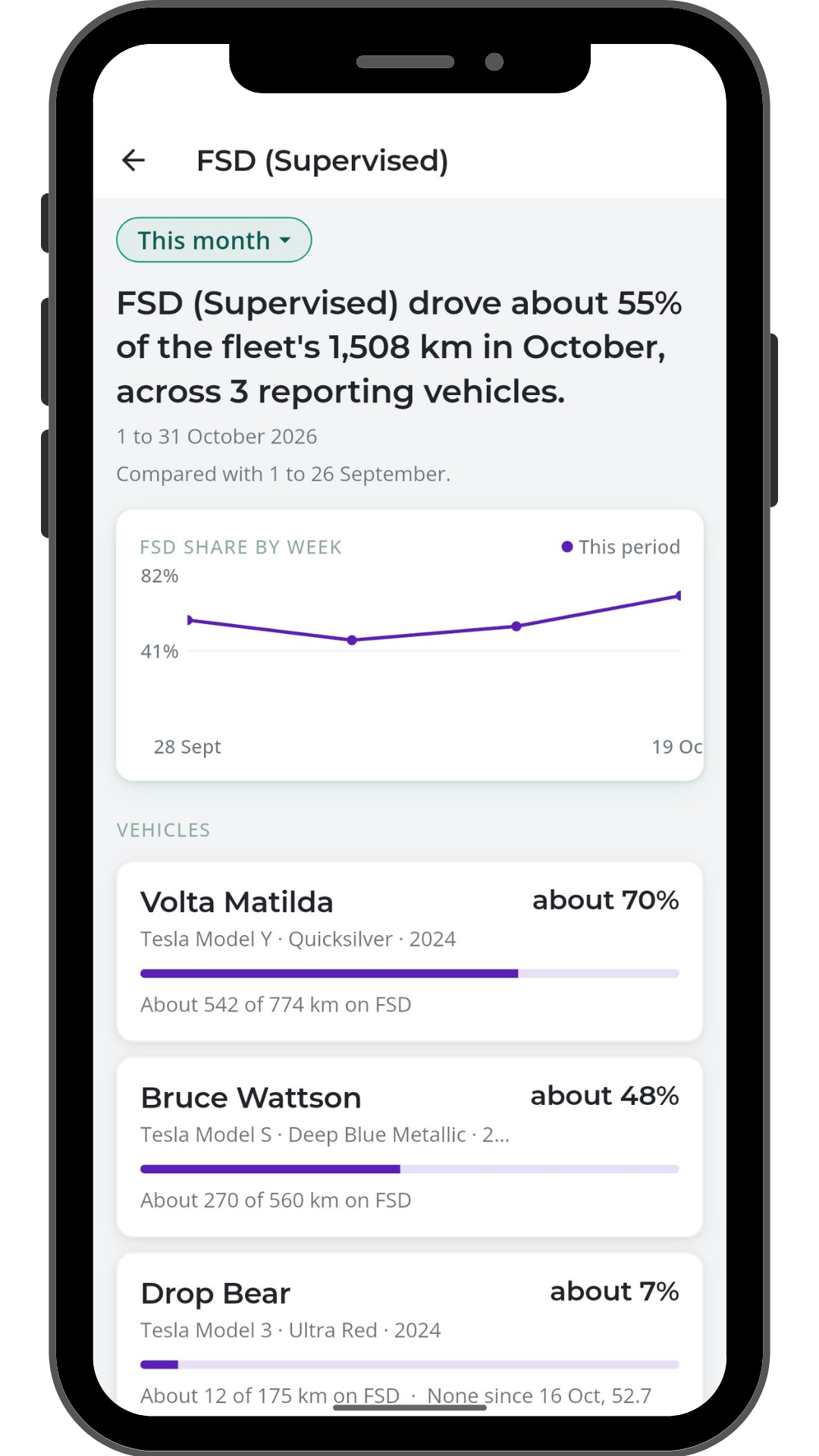
This month, right on your home screen

Open the CAILO Connect app and the home screen shows this month’s FSD (Supervised) share for every Tesla on your account. One tap goes to each car’s story.

  • This month’s FSD (Supervised) share for each car on Home
  • One tap from Home to each car’s FSD (Supervised) story
  • Every trip in your trips list shows its FSD (Supervised) share
CAILO Connect mobile app home screen showing this month's FSD (Supervised) share for each Tesla on the account
Beyond the Tesla app

Three things the free Tesla app does not do together

The free Tesla app added FSD stats in July 2026 for recent months. CAILO Connect adds history, context and a story you can explore.

Every month, saved for you

Your FSD (Supervised) story is kept from the day you connect, month after month, not just the recent few. Your record stays with you for the life of your CAILO Connect account.

FSD on your trip map

Every FSD (Supervised) stretch is highlighted right on your trip map, so you can see where your Tesla drove itself at a glance. No separate screens to piece together.

Insights, not just numbers

Watch your FSD (Supervised) share trend week by week and month by month, see where you rely on it most, and relive the moments worth remembering. The story behind the numbers.

Honest limits

What FSD (Supervised) tracking does, and does not, do

We say these limits up front so you don’t find them later. HW4 only · recent firmware · FSD (Supervised) only · approximate figures · starts when you connect · a record, not a judgement.

FAQs

FSD (Supervised) tracking questions

HW4 (Hardware 4) Teslas on recent firmware (2025.44.25.5 or later), with FSD (Supervised) enabled. HW3 cars and cars without FSD do not report the FSD counter.

No. CAILO Connect tracks FSD (Supervised) only. Autopilot and Enhanced Autopilot are not counted.

The figures move in steps of about 1.6 km, so short trips may show 0 or round up. Shares are approximate, from what the car reports.

No. Your FSD (Supervised) record starts the day you connect your Tesla to CAILO Connect. From then on, every month is kept.

Both. The web portal has the deepest analysis (map, speed chart, car story, all cars view, spreadsheet export). The iPhone and Android apps show this month’s share for each car on the home screen, with one tap to each car’s story.

No. FSD (Supervised) tracking is included in the $16 AUD per vehicle per month CAILO Connect subscription. There are no feature tiers.

No. CAILO Connect shows how much of your driving was on FSD (Supervised). It doesn’t show interventions, and it doesn’t rate how anyone drove.

NEW

No. Your Tesla reports its FSD (Supervised) distance and CAILO Connect matches it to each trip. There’s nothing to start or stop.

NEW

Got a question we haven’t answered? See all CAILO Connect FAQs →

Start keeping your FSD (Supervised) record from today

Connect your Tesla once. Every trip, every car, every month, kept.

$16 per car per month after. Cancel any time.