Simple Integration
How CAILO Connect Works
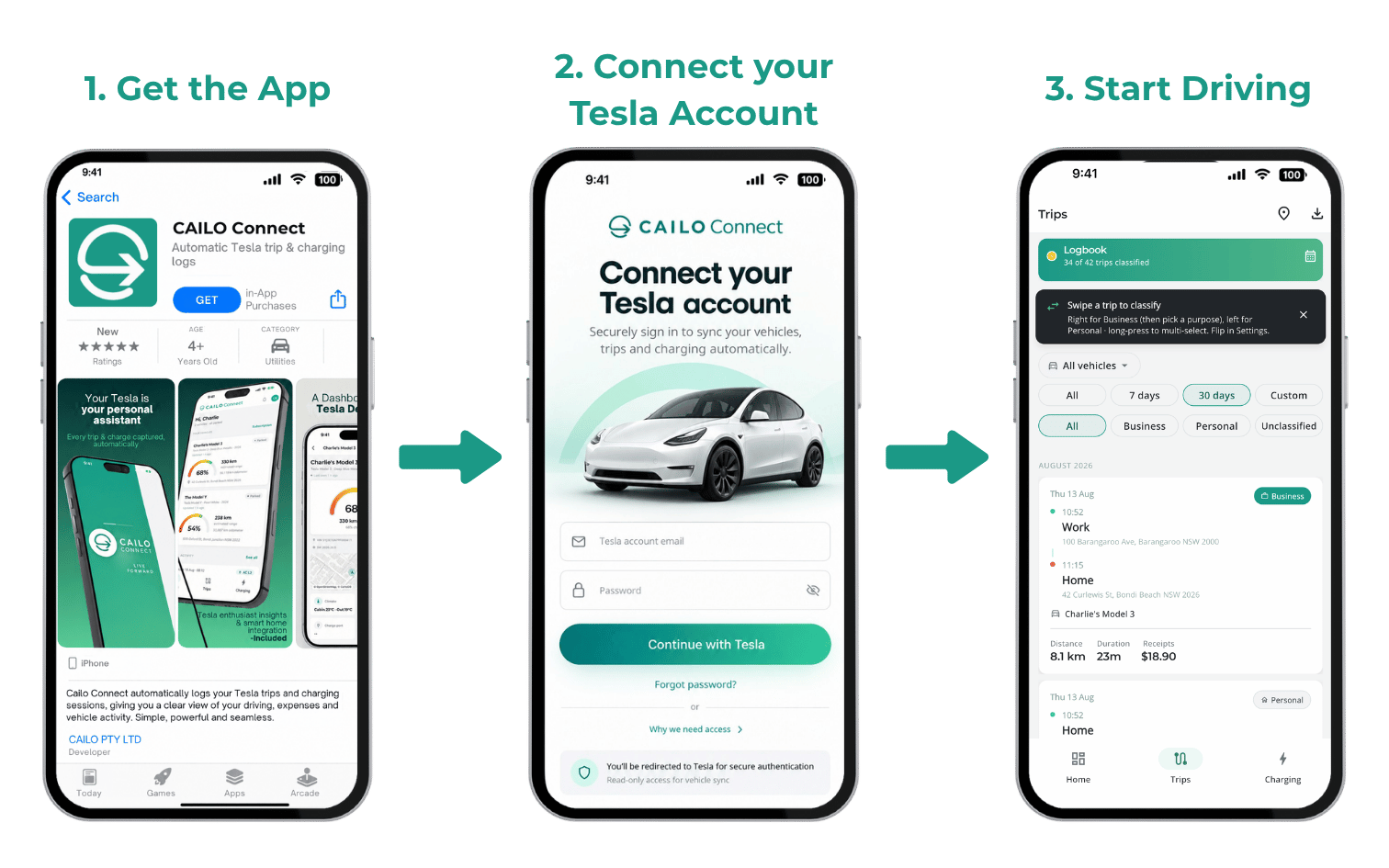
Three simple steps to connect your Tesla data to CAILO Connect.
Automate your logbook. Trigger your smart home. Manage your fleet. CAILO Connect is the no-code, no-device Tesla data platform built for every Tesla owner.
Automate your logbook. Trigger your smart home. Manage your fleet. Pick the path that’s yours.
Tesla logbook records, charging costs, and PDF and CSV exports for Tesla drivers and novated lease holders.
View Driver Features →Native Home Assistant integration, MQTT events, and Tesla-triggered automations.
View Smart Home Features →No-code Navixy, Traccar, Kafka integration with 100+ telemetry signals for your Tesla fleet.
View Fleet Features →CAILO Connect exists to put your Tesla data to work. No fragile workarounds, no devices, no paper logbooks, and no DIY pipelines to maintain. Just clean data streaming into the applications that support your life or business.
CAILO Connect makes the data your Tesla already produces available to you. Now you can put it to work across your life and business.
Connect your Tesla in minutes. No OBD dongles or hardwired devices, and no plumbing to maintain. Cloud-based and set-and-forget.
CAILO Connect delivers your Tesla data via our App or straight into the platforms you already use, in the format you need. Your data, your tools, your call.
Three simple steps to connect your Tesla data to CAILO Connect.
Everything you need to move Tesla telemetry seamlessly and securely.

Accurate telemetry including battery, location, speed, energy, and 100+ more signals.

Choose how your data is delivered: CAILO Connect App, MQTT, Kafka, AMQP, RabbitMQ, Webhooks, or platform-specific connectors.

Live data streaming with minimal latency. Your systems stay current, always.

Encrypted data transfer and permissioned Tesla account access. Your data stays yours.

Zero development required. Configure your integration and start receiving data in minutes.

Clean, real-time vehicle visibility and key trends.
Send your Tesla data wherever it needs to go.
8 delivery channels and growing.
 CAILO Connect
 Navixy
 Traccar
 Home Assistant
 Kafka
Kafka
 MQTT
MQTT
 RabbitMQ
 Webhooks
CAILO Connect connects through the official Tesla Fleet API. There is no hardware to install, no OBD dongles or hardwired devices, and no modifications to your vehicle. You simply authorize CAILO Connect with your Tesla account, and data flows automatically.
Absolutely. All data is encrypted in transit using TLS 1.2+ and at rest using AES-256. CAILO Connect never stores your Tesla account credentials. We use OAuth token-based authentication instead. You can revoke access at any time from your Tesla account.
CAILO Connect supports 8 delivery channels including our native CAILO Connect App, MQTT, Kafka, RabbitMQ, Webhooks, Home Assistant, Navixy, and Traccar. Whether you want to view your data in our app, connect to your smart home, or integrate with a fleet management platform, we have a channel for you.
CAILO Connect provides access to 100+ telemetry signals including battery level, charging status, location, speed, odometer, tire pressure, cabin temperature, energy consumption, trip history, and much more.
CAILO Connect supports all Tesla models that are compatible with the Tesla Fleet API, including Model S, Model 3, Model X, Model Y, and Cybertruck. As Tesla expands API support, CAILO Connect automatically gains access to new models.
No. CAILO Connect is a cloud-based, read-only integration that uses Tesla's official Fleet API. It does not install anything on your vehicle, does not modify any systems, and has no impact on your warranty or battery life.
You can log into the CAILO Connect Portal at any time to check your vehicle's connection status. You can also verify connectivity directly from your Tesla by tapping the touchscreen console. Navigate to Settings and look for third-party connection details under the vehicle's data sharing preferences.
Whether you’re a Tesla driver, a smart home builder, or a fleet operator, your Tesla data is ready when you are.